



















































































Managing recurring access and repeat users
Parking passes allow vehicles to access a parking location based on a predefined validity period instead of per-session payment.
A pass replaces repeated manual entry, exit, and payment with a controlled, pre-paid access model.
It is commonly used for residents, employees, subscribers, or frequent visitors.
In SISTEM, passes are tightly linked to:
- Vehicle numbers
- Time validity
- Parking-level rules
- Pricing and taxes
Why parking passes exist
Without passes, frequent users create operational friction:
- Repeated manual entries
- Daily payments
- Higher queue times
- Increased operator workload
Parking passes solve this by:
- Reducing on-site transactions
- Speeding up entry and exit
- Ensuring predictable revenue
- Improving user experience for repeat customers
Types of parking passes
SISTEM supports time-based parking passes.
Common pass types include:
- Hourly passes
- Daily passes
- Monthly passes
- Quarterly passes
- Custom duration passes
Each pass type defines how long access is valid, not how long a vehicle stays per visit.
How parking passes work in SISTEM
A parking pass follows a simple lifecycle:
- Pass rate is defined by an admin
- A pass is issued to a vehicle
- The vehicle enters and exits using pass-based validation
- SISTEM tracks usage and validity
- The pass expires or is renewed
Pass validation happens automatically during entry or exit, depending on the configured flow.
Pass rates define how passes behave, how long they are valid, and how they are billed.
Step 1: Access pass settings
- Log in as an admin or manager.
- Go to Parking settings.
- Open Pass rates.
Step 2: Create pass for particular vehicle type
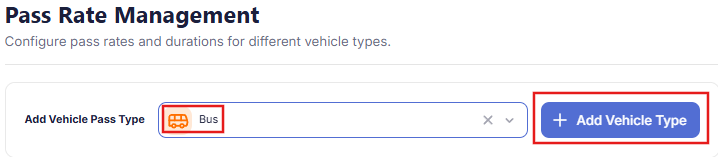
Admins can create time-based passes of particular vehicle type. Choose the vehicle type (car, bike, etc.) and add the vehicle type.
It’s essential to define the rates for all types of vehicles parked in your parking.
Step 3: Configure capacity and status
- Add the vehicle capacity
- Set the pass status to Active
- Save the pass configuration
Step 4: Apply taxes and confirm the pass
- Select applicable tax rules for the pass
- Taxes are applied automatically during billing
- Tax configuration remains consistent across sessions using the pass
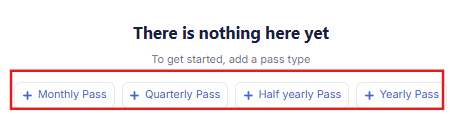
Step 5: Add the pass tiers and pricing
For each pass type:
- Set the pass tiers (weekly, monthly, quarterly, yearly)
- Set the number of days and price of that tier.
- Save the pass tiers and you can start using them.
Pass visibility and management
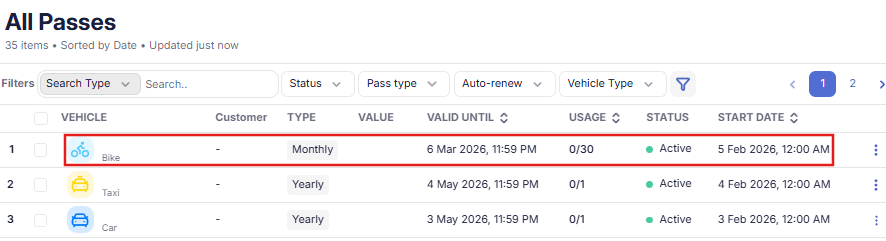
Admins and managers can view and manage passes from the parking dashboard.
They can:
- View active and expired passes
- Search passes by vehicle number
- Edit validity or vehicle details
- Deactivate or cancel passes
Every change is logged for audit purposes.
Check you live passes list in SISTEM
Interaction with live parking sessions
Even with passes enabled, SISTEM still creates parking sessions.
For pass-based sessions:
- Entry and exit are tracked
- Duration is recorded
- Amount is set to zero or marked as pass-covered
- Entry mode shows as Pass
This ensures reporting and occupancy remain accurate.
Common use cases
Parking passes are ideal for:
- Residential parking
- Office employee parking
- Subscription-based commercial parking
- Long-term customer access
- Controlled access environments
They are especially useful in high-frequency entry scenarios.
Operational controls and security
Pass usage is governed by:
- Parking-level rules
- Vehicle number validation
- Role-based access for issuing or editing passes
Unauthorized vehicles or expired passes are automatically blocked.
Parking passes help shift parking from transactional usage to predictable, subscription-driven operations without adding complexity on the ground.
What to read next
- Pass-based entry
- Auto-renewal and validity
- Pass usage tracking