



















































































Pass rates are where you decide which vehicle types can use passes, and which pass durations are actually available for each one.
This is different from issuing a pass to a specific customer’s vehicle that happens later, at check-in or from the Passes tab. Pass rates are about setting up the structure itself, at the parking level, before any pass is ever issued.
Why This Matters
Not every vehicle type needs the same pass options. A car might make sense as a Monthly or Yearly commitment, while a bike at the same parking might only need a Quarterly option it entirely depends on how that type of vehicle actually uses your parking.
This is a decision every organization makes for itself: you choose exactly which pass durations to offer, for which vehicle types. There’s no default that fits every parking the right setup depends on your actual users.
How Pass Rates Are Structured
Like vehicle rates, pass rates are configured per vehicle type, per parking. Each vehicle type’s pass rate includes:
- The vehicle type it applies to
- The capacity assigned to that vehicle type
- Its status — active or inactive
- The applicable tax
- A pricing type of Flat Rate — since a pass charges a fixed price for a chosen duration, rather than the duration-based tiers used in vehicle rates
Once a vehicle type is set up, you decide which pass durations to actually enable for it.
Setting Up Pass Rates
Step 1: Go to Pass Rates
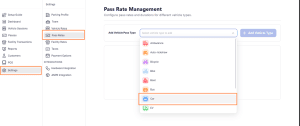
Navigate to Settings → Pass Rates. This opens Pass Rate Management, where pass options are configured per vehicle type.
Step 2: Add a vehicle pass type
Use the Add Vehicle Pass Type field to select a vehicle type — Car, Bike, Bus, and others are supported. Click Add Vehicle Type to confirm.
Step 3: Configure the vehicle type
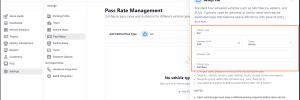
In the setup panel, fill in:
- Capacity Limit (required) — the maximum number of this vehicle type your parking supports
- Status — Active or Inactive
- Choose Tax — the applicable tax for passes issued to this vehicle type
- Pricing Type — set to Flat Rate
Step 4: Save
Once saved, the vehicle type appears in your pass rates list, with no pass types configured yet.
Enabling Pass Types for a Vehicle
This is where the actual decision happens — choosing which pass durations to make available for that vehicle type.
You can enable any combination of:
- Monthly Pass
- Quarterly Pass
- Half-Yearly Pass
- Yearly Pass
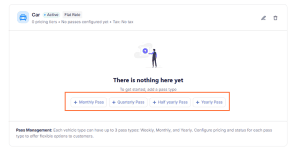
For example, you might enable Monthly and Yearly for cars, while only enabling Quarterly for bikes — the combination doesn’t need to match across vehicle types.
For each pass type you enable, define:
- The number of days that duration covers
- The price for that tier
Once saved, that pass type becomes available for issuing to actual vehicles.
Deciding Which Pass Types to Enable
There’s no fixed rule here — it comes down to understanding how each vehicle type actually uses your parking. A few things worth thinking through:
- Which vehicle types have consistent, repeat visitors? These are the ones worth offering passes for in the first place.
- What commitment length makes sense for each? A resident’s car might justify a Yearly option; a visiting contractor’s vehicle might only ever need Monthly.
- Avoid enabling options nobody will use. Every pass type you enable adds a choice your team has to manage and your customers have to consider it’s worth keeping this to what’s actually relevant.
The goal is a pass structure that matches real behavior, not one that offers every possible option by default.
Managing Pass Rates Over Time
Pass rates aren’t fixed once configured — admins and managers can adjust them as needed:
- Enable or disable specific pass types for a vehicle
- Update pricing or duration for any pass tier
- Activate or deactivate a vehicle type’s pass rate entirely
Changes apply to new passes going forward, without affecting passes already issued.
How This Connects to Issuing Passes
Once pass types are enabled here, they’re what actually shows up when issuing a pass to a specific vehicle — for example, when creating a pass from the Passes tab. This article covers building that structure; the Pass-Based Entry article covers actually issuing a pass and checking in a vehicle that has one.