



















































































Pass-based entry is built for vehicles that visit regularly residents, employees, members, or anyone with ongoing access to your parking. Instead of treating every visit as a new, one-off session, SISTEM recognizes the vehicle automatically and applies the rules tied to its pass.
There are two parts to this: issuing a pass (done once, ahead of time) and checking the vehicle in (done every time it visits, and mostly automatic).
When to Use Pass-Based Entry
Pass-based entry works well for:
- Residents in gated communities or apartment complexes
- Employees at offices or commercial buildings
- Members at clubs, gyms, or similar facilities
- Any recurring visitor you don’t want to re-verify manually every single time
The Problem It Solves
Without passes, every visit even from the same vehicle, every single day has to go through the same manual entry: entering the number plate, picking a category, checking the rate. For recurring users, that’s repetitive for the operator and slower for the visitor.
Pass-based entry removes that repetition. Once a pass is issued, SISTEM remembers the vehicle and applies its rules automatically the next time it shows up.
How to Issue a Pass
Passes are created in the Passes tab — this is where the setup happens, before the vehicle ever needs to check in.
Step 1: Open the Passes tab
Enter the vehicle number.
Step 2: Select the vehicle category
Choose the category that matches the vehicle for example, Car, Bike, or Auto-rickshaw.
Step 3: Choose the Pass Type
Select the pass type that applies to this vehicle from the available options.
Step 4: Set the Start Date
Choose when the pass should become active.
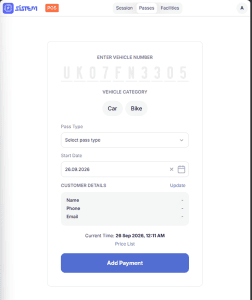
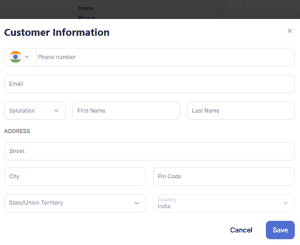
Step 5: Add customer details
Enter the passholder’s name, phone, and email, so the pass is tied to the right person.
Step 6: Review the price
Check the applicable rate under Price List if needed.
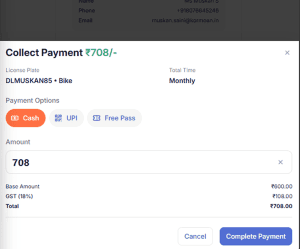
Step 7: Confirm payment
Click Add Payment to complete the pass setup.
Once this is done, the vehicle is recognized by SISTEM going forward — no need to repeat this process on every visit.
How to Check In a Pass Holder
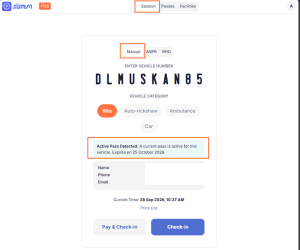
This happens in the same Session tab used for manual entry — there’s no separate check-in screen for pass holders.
Step 1: Enter the vehicle number
Type in the vehicle’s number plate as usual.
Step 2: Let SISTEM detect the pass
If an active pass exists for that vehicle, SISTEM automatically shows an Active Pass Detected banner, along with the passholder’s name, phone, and email, and highlights the correct vehicle category — no need to select it manually.
Step 3: Choose how to proceed
Select Pay & Check-in or Check-in, just as you would for any other vehicle.
Step 4: Confirm the entry
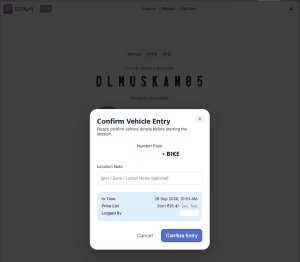
A Confirm Vehicle Entry window opens, showing the vehicle details, the auto-filled In Time, the applicable rate, and who it’s Logged By. You can add an optional Location Note here too.
Step 5: Complete check-in
Click Confirm Entry to start the session.
The rest of the session — exit, billing, and completion — follows the same flow as any other vehicle, except pricing and validity are governed by the pass rather than a standard walk-in rate.
Why Pass-Based Entry Matters
- It speeds up entry for your most frequent visitors
- It reduces manual work for operators on repeat traffic
- It keeps recurring access properly tracked, with expiry dates enforced automatically
- It gives you a reliable way to distinguish regular users from one-time visitors in your reports
Built to Scale With You
Pass-based entry works alongside manual, ANPR, and RFID entry within the same parking. A resident might check in automatically via an active pass, while a visitor is handled through manual entry at the same location — all within the same vehicle session model, so your reporting and billing stay consistent no matter how a vehicle got in.