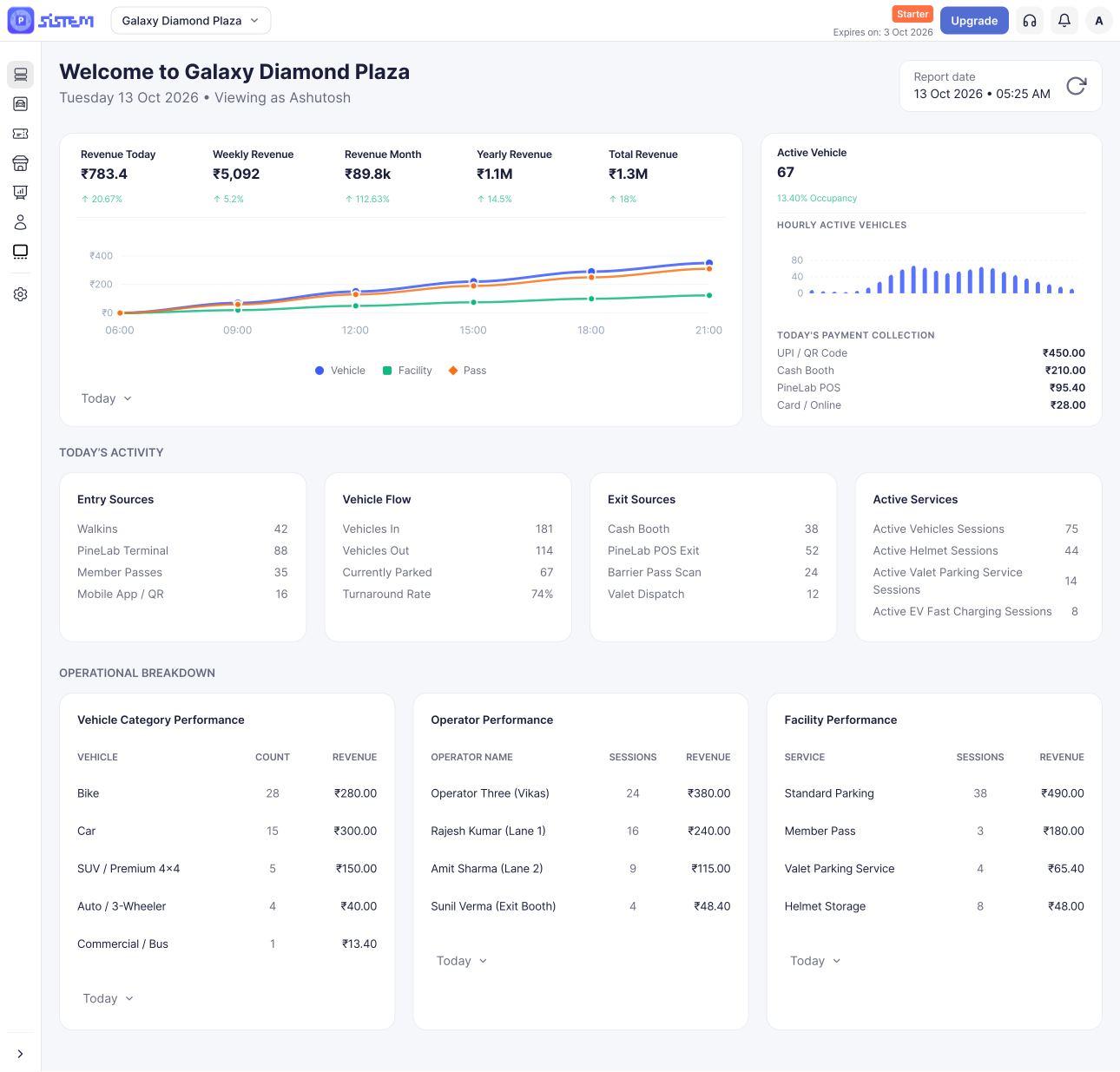



















































































Taxes are an important part of managing parking payments. They help ensure that the correct tax amount is added to parking charges and is clearly reflected in customer transactions.
In SISTEM, you can configure taxes at two levels:
- Organization level
The tax applies to all parkings under your organization. - Parking level
The tax applies only to a specific parking.
This gives you flexibility when different parking locations have different tax requirements.
Why Are Taxes Important in Parking?
Parking charges are customer transactions, so the applicable taxes need to be correctly calculated and included in the amount charged.
Configuring taxes in SISTEM helps you:
- Calculate the correct customer amount by adding the applicable tax to parking charges.
- Maintain consistent tax rules across your parking locations.
- Reduce manual calculations and the possibility of tax-related errors.
- Show tax information clearly on applicable customer transactions and documents.
- Support financial record-keeping and compliance by maintaining the tax information used for your parking operations.
- Manage multiple parkings more easily by setting common taxes once at the organization level.
Important Note
Tax requirements can vary depending on your business, location, and applicable regulations. Make sure you configure the tax rates and tax types according to the requirements applicable to your organization.
How Tax Configuration Works in SISTEM
SISTEM provides two levels of tax configuration.
1. Organization-Level Taxes
- Organization-level taxes are configured for your entire organization.
- Once configured, these taxes apply to all parkings under the organization.
- This is useful when all your parking locations follow the same tax rules.
Example: If your organization operates five parking locations and the same tax applies to all five, you can configure the tax at the Organization level instead of setting it up separately for each parking.
2. Parking-Level Taxes
- Parking-level taxes are configured for an individual parking.
- These taxes apply only to that particular parking.
- This is useful when a specific parking has different tax requirements from the rest of your organization.
Example: If your organization operates multiple parkings but one location has a different applicable tax rate, you can configure the tax specifically under that parking’s settings.
How to Add an Organization-Level Tax
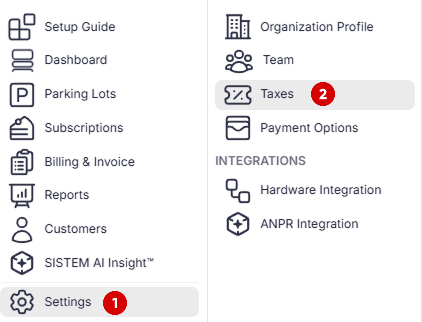
Step 1: Open Organization setting
Open the organizational setting
Step 2: Click on Taxes under Org- level setting
Click on taxes to proceed
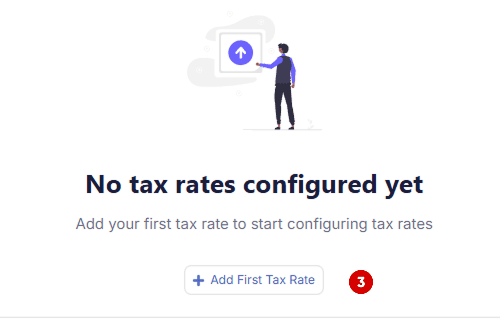
Step 3: Add the Tax Rate
In the Taxes section, add the required tax information, such as:
- Tax name
- Tax rate
- Other tax details required by SISTEM
Make sure the information matches the tax requirements applicable to your organization.
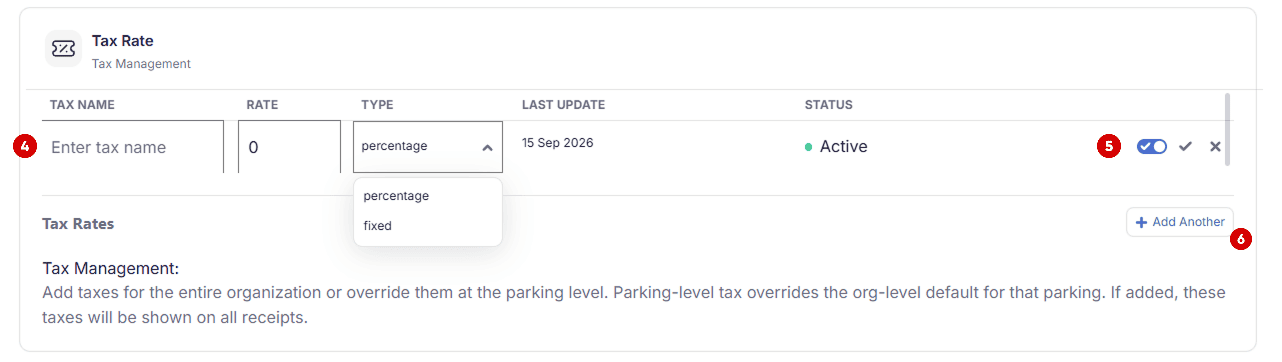
Step 4: Enter the Tax Name
Enter the name of the tax you want to add, such as GST, VAT, or Sales Tax, in the Tax Name field.
Step 5 : Confirm the Tax Name
Review the tax name you entered and select Confirm to save and add the tax to your organization.
Step 6 : Add Another (optional)
If your organization uses multiple taxes, select Add Another and repeat the process to add additional tax names.
How to Add a Tax for a Specific Parking
If a particular parking requires a different tax configuration, you can manage it from the parking settings.
Step 1: Open the Parking Setting
Open the parking you want to add taxes for and navigate to parking setting.
Step 2: Open Taxes
Navigate to taxes under parking setting
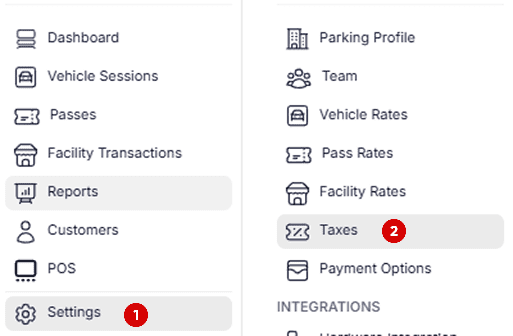
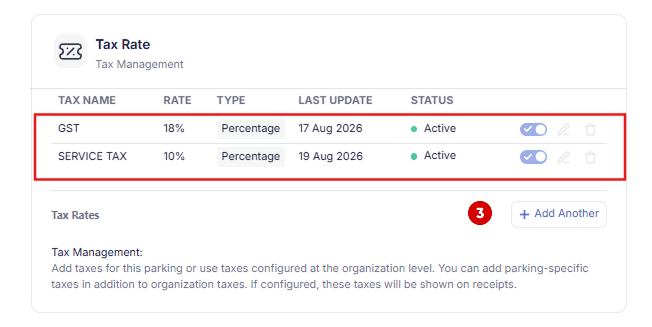
Step 3: Add the parking level taxes
Enter the required tax information for that parking by choosing “Add Another”
Review the tax name, rate, and other applicable details.
Save the details.
Note : You can see the organization enables taxes already present for the parking which cannot be updated or removed. It will be visible by default.
When Should You Use Each Tax Level?
Use Organization-level taxes when:
- The same tax applies to all your parkings.
- You want to manage common tax rules from one place.
- You operate multiple locations under the same tax structure.
Use Parking-level taxes when:
- A specific parking has different tax requirements.
- Tax rates differ between locations.
- A particular parking needs its own tax configuration.
Benefits of Configuring Taxes in SISTEM
Accurate Tax Calculation
Configured taxes help SISTEM apply the appropriate tax to applicable parking charges instead of relying on manual calculations.
Consistent Tax Application
Organization-level configuration helps maintain consistent tax rules across multiple parkings.
Easier Multi-Parking Management
If you manage several parking locations, you don’t need to configure the same tax separately for every location when the tax is common across the organization.
Better Financial Records
Having tax information configured in the system helps keep parking transactions and financial records more organized.
Compliance Support
Correctly configured taxes help your business maintain records that support applicable tax and financial compliance requirements.
Fewer Manual Errors
Automating tax application reduces the risk of forgetting to add a tax or applying the wrong rate during a transaction.