



















































































Every parking in SISTEM has a lifecycle. At some point, you may need to pause it, or remove it altogether. SISTEM gives you two distinct ways to do this suspending and deleting and they’re kept intentionally separate to prevent accidental data loss or operational disruption.
Why This Matters
These two actions look similar, but they lead to very different outcomes:
- Suspending pauses a parking. It’s reversible, and nothing is lost.
- Deleting removes a parking permanently, along with its data. It cannot be undone.
Understanding this difference before you act matters, since both options live in the same menu — choosing the wrong one isn’t a small mistake, it’s the difference between a temporary pause and permanent data loss.
Suspending a Parking
Suspending is meant for temporary pauses — the parking isn’t gone, it’s just inactive for now.
What happens when a parking is suspended:
- No new vehicle entries are allowed
- Any ongoing sessions must be completed before the parking can be deactivated
- Operators can no longer perform entry or exit actions
- All historical data remains fully accessible
- The parking stays visible in SISTEM, just marked as inactive
When to use suspend:
- You plan to resume operations later
- You want to preserve historical reports
- You want to keep pricing, passes, and configurations intact
- The closure is temporary — a renovation, a seasonal break, or a short-term shutdown
Because everything is preserved, you can reactivate a suspended parking and pick up right where you left off, with no reconfiguration needed.
Deleting a Parking
Deleting is meant for a parking that’s genuinely done — not paused, but permanently closed.
What happens when a parking is deleted:
- The parking is permanently removed from SISTEM
- All configurations tied to it are deleted
- Historical sessions and reports related to it are removed
- The action cannot be undone
Because deletion affects historical data, SISTEM restricts this to users with the right level of access — not every role can perform it.
When to use deletion:
- The parking was created by mistake
- It will never be used again
- You no longer need its historical data
- You’re cleaning up unused test or duplicate parkings
Once deleted, there’s no getting it back — so this should only be used when you’re certain.
How to Suspend or Delete a Parking
Both actions start the same way — they only differ at the final step.
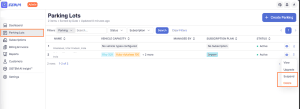
Step 1: Go to Parking Lots Open the Parking Lots section from your dashboard.
Step 2: Find the parking Locate the parking you want to suspend or delete from the list.
Step 3: Open the options menu Click the ⋮ menu next to that parking.
Step 4: Choose your action
- Select Suspend to pause the parking — it takes effect immediately, and you can reactivate it anytime.
- Select Delete to remove it permanently. SISTEM will show a confirmation prompt before proceeding — read it carefully, since confirming means the parking and all its data are gone for good.
Who Can Do This
Suspending or deleting a parking is restricted by role, to keep this kind of decision in the right hands:
| Role | Can Suspend | Can Delete |
|---|---|---|
| Admin | Yes | Yes |
| Manager | Yes | Typically no |
| Operator | No | No |
This ensures a parking can’t be paused or removed by someone without the authority to make that call.
Before You Proceed
Whether you’re suspending or deleting, it’s worth checking a few things first:
- Confirm there are no active parking sessions still running
- Make sure all pending payments have been completed
- Review or export any reports you might need later
- Let your team know, especially anyone currently assigned to that parking
These checks help avoid incomplete records or confusion on the ground once the action is taken.
System Safeguards
SISTEM includes a few safeguards to reduce the risk of an accidental or premature action:
- Confirmation prompts before the action is finalized
- Warnings when historical data will be affected
- Permission-based access, so only the right roles can act
- Audit logs recording every lifecycle change, for traceability
Impact on Billing and Reports
- A suspended parking stops generating sessions and revenue, but your organization’s billing and subscription status is unaffected — it operates at the organization level.
- A deleted parking removes its historical data entirely — once it’s gone, you can no longer report on it.
If reporting continuity matters to you, suspending is always the safer option.
Suspend vs. Delete, at a Glance
| Suspend | Delete | |
|---|---|---|
| Reversible? | Yes — reactivate anytime | No — permanent |
| Data | Fully preserved | Permanently removed |
| Who can do it | Admins and managers | Admins (typically) |
| Best for | Temporary pauses, uncertainty | A parking that’s genuinely done |
Best Practice
Use suspend when:
- You need flexibility
- You want to preserve your data
- There’s a real chance operations will resume
Use deletion only when:
- You’re certain the parking is no longer needed
- Its historical data isn’t required
- It was created in error
Suspending or deleting a parking is a structural decision, not a minor toggle. When in doubt, suspend — it costs you nothing and keeps every option open. Delete only once you’re sure.