



















































































Manual entry is the simplest of SISTEM’s entry methods: an operator records the vehicle directly, on-site, using SISTEM. It’s built for parkings that don’t rely on hardware like ANPR cameras or RFID readers or that want a human involved in verifying every vehicle.
Even without automation, manual entry keeps every vehicle tracked digitally, with full visibility into timing, duration, pricing, and revenue.
When to Use Manual Entry
Manual entry works well for:
- Open parking lots
- Event or temporary parking
- Locations with high walk-in traffic
- Sites transitioning from manual operations to automation
- Backup operations when hardware systems go down
It keeps your parking structured and auditable, with or without automated hardware in place.
The Problem It Solves
Before a system like SISTEM, most manual parking operations run on:
- Paper slips
- Verbal handoffs between shifts
- Cash-only tracking
- End-of-day reconciliation
This usually leads to missing or inconsistent records, revenue leakage, no real session history, and no way to trace who did what. Manual entry in SISTEM replaces all of that with a structured, digital vehicle session — every vehicle is recorded, priced correctly, and reflected accurately in your reports.
How It Works
Instead of a one-off log entry, SISTEM creates a full session that tracks the vehicle from the moment it arrives to the moment it’s billed and gone.
Recording an Entry
- Open the Session tab and select Manual as the entry method.
- Enter the vehicle’s number plate.
- Select the vehicle category (e.g., Car, Bike, Auto-rickshaw, Ambulance).
- Check the applicable rate under Price List if needed.
- Choose how you want to proceed:
- Pay & Check-in — if the customer is paying upfront.
- Check-in — if payment will happen at exit instead.
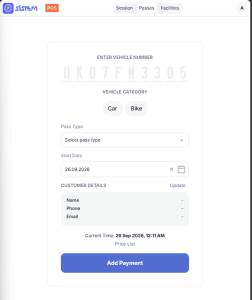
- A Confirm Vehicle Entry window opens so you can review the details before the session starts:
- The number plate and vehicle type are shown for a final check.
- You can optionally add a Location Note (spot, zone, or locker) to help identify where the vehicle is parked.
- The In Time, applicable Price List rate, and the operator it’s Logged By are filled in automatically.
- Click Confirm Entry to start the session, or Cancel to go back and make changes.

Once confirmed, SISTEM automatically generates a parking receipt — including a token number, vehicle details, entry time, and rate — which can be printed or shared with the customer.
Recording an Exit
- Find the vehicle’s active session — sessions can typically be searched by vehicle number.
- Select the vehicle live session and click checkout

- SISTEM automatically calculates:
- Total parking duration
- Applicable pricing
- Final amount payable
- If payment wasn’t collected at entry, complete it now — via cash, digital payment, or an applicable pass/subscription.

5. Once payment is confirmed, the session status changes to Completed.
Why Manual Entry Still Matters
Even in fully automated parkings, manual entry isn’t just a fallback — it’s a first-class part of how SISTEM operates:
- It keeps things running if hardware (ANPR, RFID, gates) goes down
- It handles edge cases automation can’t — a damaged plate, a new visitor, an override
- It lets you transition to automation gradually, instead of all at once
- It ensures operations never fully stop, even without hardware
Built to Scale With You
You can start with manual entry alone, and layer in more as you grow:
- Pass-based entry for recurring users
- ANPR for automated plate recognition
- RFID or other hardware integrations
Because every method — manual or automated — creates the same kind of vehicle session underneath, your operations, reports, and billing stay consistent no matter how you scale.