



















































































Facility capacity defines how many users or units of a facility can be used at a time. Usage tracking ensures that services are not overbooked and remain available as intended.
In SISTEM, capacity helps you control access to facilities such as:
- Number of lockers storages
- EV charging points available at parking
- Valet slots
- Restroom access (if limited)
- Premium parking zones
By setting capacity, you ensure fair usage, prevent conflicts, and maintain service quality.
Why facility capacity matters
Without capacity control, facilities may become:
- Overbooked or unavailable
- Difficult to manage during peak hours
- A source of customer disputes
- Operationally inefficient
Capacity management helps you:
- Maintain service availability
- Prevent operator errors
- Improve customer experience
- Optimize resource utilization
- Track usage trends for expansion decisions

How facility capacity works in SISTEM
Capacity is defined when creating or editing a facility.
It determines how many concurrent usages are allowed.
SISTEM uses capacity to:
- Allow or restrict new facility usage
- Show availability to operators
- Prevent over-allocation
- Track active and completed usage
Once the capacity limit is reached, operators cannot assign the facility until a slot becomes available.
How capacity is tracked
SISTEM tracks facility capacity in real time as facilities are used.
For each facility usage session, the system records:
- Facility name
- Start and end time
Assigned vehicle or user - operator actions
- Charges applied
Capacity behavior
- When a facility is assigned → available capacity decreases
- When the session ends → capacity is released
- When capacity reaches zero → new assignments are blocked
Operators do not need to track availability manually.
How usage is tracked
SISTEM tracks facility usage in real time.
For each usage session, the system records:
- Facility name
- Start and end time
- Assigned vehicle or user
- Operator actions
- Charges applied
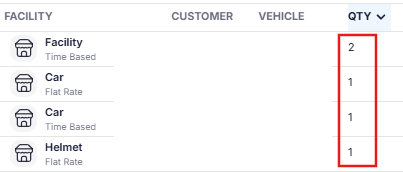
When a facility is in use, the available capacity decreases automatically.
When the session ends, the capacity is released.
Interaction with live operations
During live operations:
- Operators see available capacity before assigning a facility
- SISTEM prevents assignments when capacity is full
- Availability updates automatically when sessions end
This ensures facilities are used within limits without manual tracking.
Capacity scenarios
Limited capacity example
EV charging station with 4 points
- 4 active sessions → facility full
- New request → assignment blocked
- Session ends → slot becomes available
Shared facility example
Locker storage with 100 units:
- Each assignment uses 1 unit
- Capacity reduces with each allocation
- Availability updates in real time
Operational best practices
- Set capacity based on physical availability
- Avoid setting unlimited capacity unless intentional
- Monitor usage trends to plan expansion
- Review peak-hour utilization
- Keep capacity updated after infrastructure changes
Proper capacity management ensures reliable service delivery.
Read next
What are facilities?
Predefined facilities
Custom facilities