

Invoices and payment methods

SISTEM handles billing as part of your parking operations, not as a separate financial tool. Subscriptions, invoices, and payment methods are built into the platform so you can manage costs, track payments, and maintain financial clarity from one place.
The goal is simple: make billing predictable, transparent, and easy to manage as your parking operations grow.
The Problem SISTEM solves
In many parking setups, billing is handled outside the operations system. This creates gaps between usage and payments, leading to confusion and manual reconciliation.
Common issues include:
- Invoices generated manually or in separate tools
- No clear link between subscriptions and payments
- Difficulty tracking payment status across locations
- Limited visibility into billing history and financial records
- Inconsistent payment methods across multiple parkings
SISTEM replaces this fragmented approach with integrated billing that aligns with how parking is actually operated.
How billing works in SISTEM
Billing in SISTEM is tied to subscriptions and plans. Every parking operates under a plan, and invoices are generated automatically based on the selected billing cycle.
Key principles
- Invoices are auto-generated for monthly or yearly subscriptions
- Payments are recorded against each invoice
- Billing is visible only to Organization Admins for security and control
- Payment methods can be configured at both organization and parking levels
This structure ensures financial control without complicating daily operations.
Invoices
An invoice is created for every active subscription cycle.
What invoices include
- Billing period
- Plan and add-ons in use
- Total amount charged
- Payment status
- Invoice date and reference details
Once payment is completed, the invoice is stored for future reference and compliance.
Where to view invoices
Invoices are accessible to Organization Admins from:
Organization Settings → Billing and Invoices
This ensures financial data remains centralized and secure.
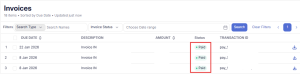
Steps to view and download invoices
- Go to Organization settings
- Navigate to billing and invoices
- View the list of generated invoices
- Click an invoice to see details such as billing period, amount, and status
- Download the invoice for records or compliance purposes
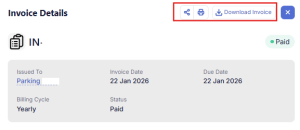
Invoice lifecycle
Billing follows a predictable flow:
- Subscription cycle begins (monthly or yearly)
- SISTEM generates the invoice automatically
- Payment is processed using the configured payment method
- Invoice status updates to Paid
- Invoice is stored in Billing & Invoices for records
This automation reduces manual work and prevents missed billing cycles.
Payment methods
SISTEM allows flexible payment configurations to support both centralized and location-specific billing.
Payment methods can be set at two levels:
Organization-level payment methods
Configured at the organization level, these act as the default payment method for all parkings.
Used when:
- Billing is centralized
- A single finance team manages payments
- Multiple parkings operate under one entity
Steps to add an organization-level payment method
- Go to Organization Settings
- Open Payment Methods
- Click Add Payment Method
- Enter payment details (card, bank account, or supported gateway)
- Save to set it as the default method for all parkings
Parking-level payment methods
Configured at the parking level, these apply only to a specific location.
Used when:
- Locations manage their own expenses
- Different payment sources are required
- Franchise or partner-operated parkings exist
Steps to Add a Parking-Level Payment Method
- Go to the specific Parking
- Navigate to Settings → Payment Methods
- Click Add Payment Method
- Enter the required payment details
- Save to apply the method to that parking only
Parking-level methods override the organization default for that location.
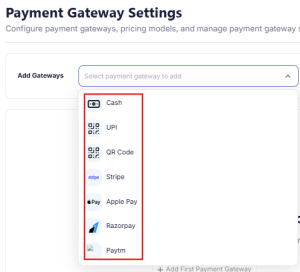
How payment scope works
- Organization-level payment methods apply to all parkings by default
- Parking-level methods override the default for specific locations
- Both can be managed from Settings without affecting operations
This layered approach supports both centralized and distributed business models.
Designed for financial clarity
SISTEM ensures that billing remains clear, traceable, and aligned with operations.
Benefits include:
- Automatic invoice generation
- Centralized financial records
- Flexible payment configurations
- Secure access limited to Organization Admins
- Clear separation between organization and parking billing
By integrating invoices and payments into the operational backbone, SISTEM helps you run parking as a business with full financial visibility and control.