

Org-level vs Parking level access

SISTEM allows you to control user permissions at two levels: organization and parking. This ensures team members can access exactly what they need no more, no less.
By separating access levels, SISTEM keeps operations secure while allowing flexibility for multi-location management.
Why access levels matter
Parking operations often involve multiple locations, teams, and responsibilities. Without access control boundaries:
- Users may view or modify unrelated locations
- Sensitive financial data may be exposed
- Operational errors may affect multiple sites
- Accountability becomes unclear
Org-level and parking-level access help maintain control while enabling efficient operations.
Understanding the two access levels
Organization-level access
Organization-level access provides visibility and control across the entire organization.
Users with this access can:
- View and manage all parking locations
- Access organization settings and billing
- Configure global integrations and preferences
- Manage team members and roles
This level is typically assigned to:
- Admin
- Finance teams
- Senior operations leaders
Because it affects the entire system, this access should be granted carefully.
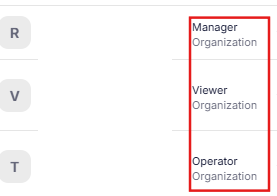
Parking-level access
Parking-level access limits users to specific parking locations.
Users with this access can:
- Operate and manage assigned parking sites
- Configure pricing and capacity for those locations
- Perform vehicle entry and exit
- Monitor site-specific performance
They cannot:
- Access other parking locations
- Change organization-wide settings
- View global financial data
This level is ideal for:
- Managers responsible for specific sites
- On-ground operators
- Location-specific supervisors
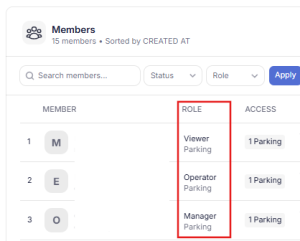
How access levels work together
SISTEM allows a mix of organization-level and parking-level access.
For example:
- An admin may manage all locations
- A manager may oversee three assigned parking sites
- An operator may work at one specific parking location
This layered approach ensures:
- Clear responsibility boundaries
- Controlled data visibility
- Reduced operational risk
Assigning access during user setup
When adding a team member, admins can:
- Select the user role
- Choose organization-level or parking-level access
- Assign specific parking locations (if applicable)
This ensures access is aligned with the user’s responsibilities from day one.
Read more how SISTEM works
When to use org-level access
Use organization-level access when a user needs to:
- Manage multiple locations
- Control billing and subscriptions
- Configure global settings
- Oversee system-wide performance
Avoid assigning org-level access for routine operational roles.
When to use parking-level access
Use parking-level access when a user:
- Works at specific parking locations
- Handles on-ground operations
- Manages site-level pricing and capacity
- Does not require access to financial or global settings
This reduces risk and keeps the system organized.
Security benefits of layered access
Separating access levels helps SISTEM:
- Prevent unauthorized changes across locations
- Protect financial and operational data
- Maintain clear audit trails
- Reduce accidental configuration errors
Each user operates within a defined scope.
Operational best practices
- Grant the minimum access required for the role
- Use parking-level access for site staff
- Limit org-level access to trusted administrators
- Review access regularly as teams change
Proper access management improves both security and efficiency.
Read next
Understanding user roles
Inviting team members