

Pre-defined Facilities

Predefined facilities in SISTEM are ready-to-use service types commonly offered at parking locations.
They help operators quickly enable standard services without creating configurations from scratch.
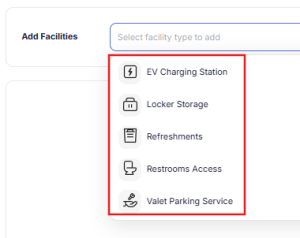
SISTEM currently supports predefined facilities such as:
- EV charging
- Locker storage
- Refreshments
- Restroom access
- Valet service
These facilities come with expected pricing models and usage patterns, making setup faster and operationally consistent.
Read more about facilities
Why use predefined facilities
Predefined facilities are useful because they:
- Reduce setup time
- Follow industry-standard pricing logic
- Ensure consistent service configuration
- Simplify reporting and analytics
- Support quick activation across multiple parkings
They are ideal for operators who want to enable common services with minimal configuration effort.
How predefined facilities work
Predefined facilities are configured at the parking level and function like structured services with pricing, usage tracking, and reporting.
Each facility includes:
- Service description
- Location mapping (optional)
- Tax configuration
- Status (active/inactive)
- Pricing model based on service type
- Usage tiers
Once activated, operators can add these services to live sessions or passes.
Steps to add a predefined facility
Step 1: Navigate to facility rates
- Go to Parking Dashboard
- Select the parking location
- Open Facility Rates
- Click Add Facility
Step 2: Select facility type
Choose a predefined facility type:
- EV charging
- Locker storage
- Refreshments
- Restroom access
- Valet
The system will suggest a suitable pricing model based on the selected service.
Step 3: Enter facility details
Provide the required information:
- Facility description — brief service details
- Location — optional physical location reference
- Tax configuration — applicable tax rules
- Status — active or inactive
Step 4: Choose pricing type
The pricing type will be pre-defined based on the facility chosen:
- Flat pricing — restroom access, refreshments
- Energy-based pricing — EV charging (per kWh)
- Flat or tiered pricing — locker storage, valet
Tip: Choose a pricing model that reflects how the service is consumed.
Step 5: Save the facility
Click Save to create the facility.
The facility is now available for tier configuration.
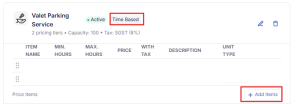
Step 6: Add pricing tiers
After creating the facility, define pricing tiers based on how the service is used.
Locker storage (item or size-based tiers)
Locker pricing can vary based on storage size or item type.
You can define tiers such as:
- Helmet locker — priced for small storage
- Bag locker — priced for medium storage
- Full locker — priced for large storage
This allows operators to select the correct tier based on what the customer stores.
EV charging (energy-based tiers)
EV charging pricing is based on energy consumption.
You can configure tiers such as:
- Lower rate for initial energy consumption
- Standard rate for moderate usage
- Higher rate for heavy consumption
This ensures customers are billed accurately based on electricity usage.
Where predefined facilities are used
Once configured, predefined facilities can be used in:
- Live parking sessions
- Pass-based access
- Standalone service billing
- Reports and analytics
All usage is automatically tracked and billed.
Best practices
- Use predefined facilities for standard services
- Match pricing model with service consumption
- Create clear tier labels for reporting
- Keep inactive facilities for audit history
- Review usage data to optimize pricing
Predefined facilities help standardize services, reduce setup effort, and ensure consistent operations across parking locations.
Related articles
Custom facilities
Facility pricing models
Managing rates and passes
Common pricing scenarios