

Signing Up & Setting Up Your Organization

The foundation before any parking goes live
Before you create a parking space in SISTEM, you first set up your organization.
This step defines ownership, billing, access control, and system-wide defaults. Everything that happens later pricing, reports, payments, depend on this foundation being correct.
You only do this once. That’s intentional.
SISTEM separates business setup from on-ground operations so that scaling later doesn’t introduce confusion or rework.
Step 1: Signing up your organization
When you sign up your organization, you create two things at the same time:
- Your organization
- Your admin account
The organization represents the entity running the parking business. This could be a company, residential society, contractor, or public authority. The admin is responsible to establish the organization within SISTEM Platform with its elevated access.
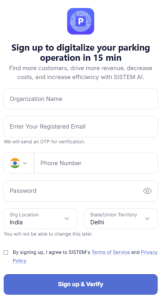
During signing up your organization, you’ll provide a few required details:
- Organization name
- Location Details
- Registered contact details
These fields are mandatory because they directly affect billing currency and tax, time-based operations and reports and audit logs.
Why this matters:
SISTEM treats organization details as foundational settings. The organization details will be used in all the parking handling in multiple locations. Parking details can be different, but organization details are the building blocks.
Step 2: Your role as organization admin
The first user who creates the organization becomes the Organization Admin.
This role has visibility and control over:
- Subscriptions and billing
- All parkings under the organization
- Organization-level team members
- Global configurations and integrations
This does not mean the admin handles daily parking operations. Instead, they govern how the system is structured and managed.
Parking-level roles for day-to-day operations can be assigned later.
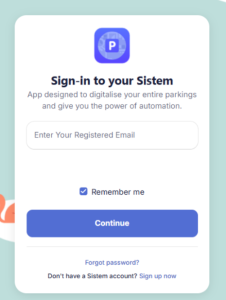
The contact details used to register the organization will become the Organization Admin login details.
If you’ve signed up, Login as admin to set up your organization and parking.
Step 3: Setting up organization profile
Once the organization is created, you can complete its profile and setup your first parking
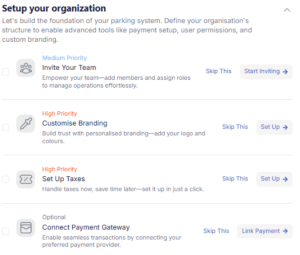
To complete the profile, you can visit the Setup Guide which assists you to complete the organization profile and also helps you to proceed to set up your first parking.
It Includes:
- Inviting org-level team members
- Customize the branding of your organization
- Setting up Org-Level Taxes
- Adding payment gateways for the different payment methods.
- Overall updating organization information
These details are strongly recommended before going live and starting your parking operations.
Why this matters:
Organization identity details appear on invoices, receipts, reports, and compliance documents. Completing them early prevents inconsistencies later.
Step 4: Taxes and compliance defaults
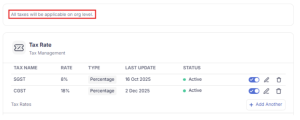
You can define the tax settings at the organization level.
This includes:
- Tax identifier and label (for example, GST or VAT)
- Tax rates and applicability
- Scope (organization-wide or parking-level overrides later)
Org-Level taxes are configured centrally, so they don’t need to be recreated for every parking.
Why this matters:
Tax logic affects billing, invoices, and compliance reporting. Centralizing it reduces errors and duplicated effort.
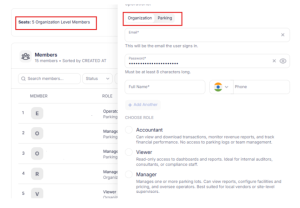
Step 5: Team setup at organization level
The organization level is where you manage global access.
You can invite users who need:
- Visibility across multiple parking
- Access to billing and subscriptions
- Oversight over configuration and reporting
Organization-level users focus on governance and oversight.
Parking-level operators for daily operations are added later once a parking lot exists.
Proceed to add your org-level members
Step 6: Billing and subscription setup
Billing in SISTEM is always managed at the organization level.
Even if subscriptions apply per parking, invoices, payments, and renewals remain consolidated under the organization.
After setting up your organization,
- You don’t need to choose a plan immediately.
- Trial periods begin when your first parking goes live and lasts 15 days.
- Billing details can be completed later when you choose any plan after trial.
However, it’s recommended to review taxes, configure payment methods, add parkings and understand the plans pricing modules for future smooth operations. It is essential that you understand which plan is suitable for your parking.
Why this matters:
This ensures a smooth transition from trial to paid usage without unexpected surprises.
Learn more about plans and pricings.
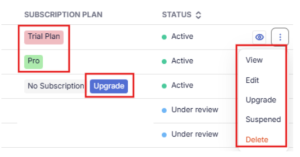
Once you are ready to upgrade, you can visit the parking lots list and choose to upgrade the parking.
Benefits of upgradation:
- You only upgrade the parking you need to.
- You can choose different plans for different parkings.
- You can stop the parking usage by suspending it and start using again when ready
- You can easily scale up and scale down based on demand.
Step 7: Integrations and system readiness
SISTEM allows you to configure integrations once at the organization level.
This may include:
- Configuring payment gateways
- Handling hardware readiness (POS, printers, scanners)
- Future third-party integrations
None of these are mandatory before creating a parking lot. Many organizations return to this step later as operations mature.
Why this matters:
Centralized integration setup prevents repeating configuration for every parking later.
Why SISTEM starts this way
Many systems rush users into operational setup and handle billing, access, and governance later. That approach often breaks at scale.
SISTEM does the opposite.
By separating organization setup from parking operations:
- Billing stays clean
- Permissions remain clear
- Multiple parkings don’t create confusion
- Growth doesn’t require restructuring
This foundation lets you start small and scale without friction.
What happens next
Once your organization is ready, you move from global setup to physical operations.
The next step is creating your first parking, defining a real-world location, its capacity, pricing, and team. This is where SISTEM begins handling live activity.
Update more details of organization from the settings
Read next
To understand how system layers work together:
How SISTEM Works
To begin operations:
Create Your First Parking
To understand billing and trials:
Understanding Trial and Plans