

Suspending or deleting parking

Managing parking lifecycle safely and correctly
What suspending or deleting a parking means
In SISTEM, parking locations have a lifecycle.
Depending on your operational needs, you can either:
- Suspend a parking to pause operations temporarily, or
- Delete a parking to permanently remove it from the system
These actions are intentionally separated to prevent accidental data loss and operational disruption.
Suspending a parking
Pausing live operations without losing data
What happens when a parking is deactivated
When a parking is suspended:
- No new vehicle entries are allowed
- Ongoing sessions must be completed before deactivation
- Operators cannot perform entry or exit actions
- Historical data remains fully accessible
Suspension is reversible and is commonly used during:
- Temporary shutdowns
- Renovations or maintenance
- Seasonal or event-based closures
The parking remains visible in the system but marked as inactive.
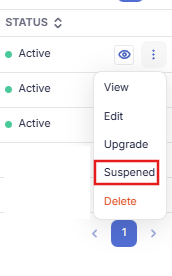
When to use suspend option
Deactivation is recommended if:
- You plan to resume operations later
- You need to preserve historical reports
- You want to keep pricing, passes, and configurations intact
- The closure is temporary
This allows you to restart operations without reconfiguring the parking.
Deleting a parking
Permanent removal from the system
What happens when a parking is deleted
Deleting a parking:
- Permanently removes the parking from SISTEM
- Deletes all configurations tied to the parking
- Removes historical sessions and reports related to it
- Cannot be undone
Because deletion affects historical data, SISTEM restricts this action to users with high-level permissions.
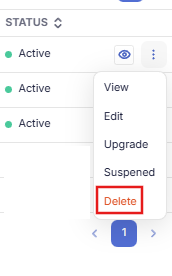
When to use deletion
Deleting a parking is appropriate if:
- The parking location was created by mistake
- The parking will never be used again
- You no longer need its historical data
- You are cleaning up unused test or duplicate parkings
Once deleted, the parking cannot be recovered.
Access and permissions
Only users with appropriate roles can deactivate or delete a parking.
Typically:
- Admins can deactivate and delete
- Managers can deactivate but may not delete
- Operators cannot perform either action
This ensures operational safety and data integrity.
Operational checks before suspension or deletion
Before proceeding, SISTEM recommends verifying:
- No active parking sessions exist. Verify parking sessions.
- All pending payments are completed. Verify pending payments
- Reports have been reviewed or exported if needed
- Team members are informed.
These checks prevent incomplete records and confusion on the ground.
System safeguards
SISTEM includes safeguards to reduce risk:
- Confirmation prompts before action
- Warnings when historical data will be affected
- Permission-based access controls
- Audit logs for all lifecycle changes
Every deactivation or deletion is recorded for traceability.
Impact on billing and reports
- Deactivated parkings stop generating sessions and revenue
- Billing and subscription status remains at the organization level
- Deleted parkings remove historical data and cannot be reported on
If reporting continuity matters, deactivation is always the safer option.
Best practice recommendations
Use suspend when:
- You need flexibility
- You want to preserve data
- Operations may resume
Use deletion only when:
- You are certain the parking is no longer needed
- Historical data is not required
- The parking was created in error
Deactivating or deleting a parking is a structural decision. SISTEM ensures you can pause or close operations without compromising data, security, or future scalability.
Read next
To manage parking configurations:
- Parking settings overview
- Create your first parking
To understand operational data:
- Live parking sessions
- Reports and analytics