

Vehicle parking rates

Defining how vehicles are charged for parking
Vehicle parking rates define how much a vehicle is charged for using a parking location.
In SISTEM, parking rates are applied automatically to vehicle sessions based on the configuration you define at the parking level. Once a rate is active, SISTEM enforces it consistently across all entry methods and operational flows.
Rates act as the commercial rules for a parking location. They remove manual calculations and ensure billing remains predictable, transparent, and auditable.
The problem parking rates solve
Without centralized parking rates, operators often rely on:
- Manual calculations
- Verbal instructions to staff
- Separate rate charts or printed boards
This leads to:
- Billing disputes
- Revenue leakage
- Operator errors during busy hours
- Inconsistent customer experience
SISTEM replaces this with a structured, system-driven approach where pricing rules are defined once and enforced automatically.
How vehicle parking rates are structured in SISTEM
Parking rates are configured inside a parking and apply only to that parking.
Each rate is linked to:
- A specific vehicle type
- A selected pricing model
- Tax rules
- Operational status (active or inactive)
Once configured, rates are used by the operations layer to calculate charges during live parking sessions.
This separation ensures that:
- Different parkings can follow different pricing
- Changes to one parking do not affect others
- Rates scale cleanly as operations grow
What a vehicle parking rate includes
A vehicle parking rate defines:
- Vehicle type the rate applies to
- Parking capacity for that vehicle type
- Pricing model selection
- Applicable tax
- Rate status (active or inactive)
The pricing model controls how charges are calculated, but the detailed logic is handled separately to keep rate creation simple.
Creating a vehicle parking rate
Step 1: Navigate to vehicle parking rates
To add or manage parking rates:
- Open the required parking
- Go to Parking settings
- Select Vehicle parking rates
Only users with admin or manager access can create or edit rates.
Step 2: Select or create a vehicle type
Parking rates are always defined per vehicle type.
You can:
- Select an existing vehicle type, or
- Create a new vehicle type if required
This ensures that each category of vehicle follows its own commercial and capacity rules.

Learn more about vehicle capacity and types
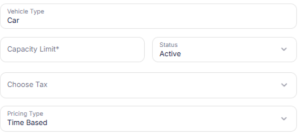
Step 3: Define capacity and tax details
For the selected vehicle type, configure:
- Capacity assigned to that vehicle type
- Rate status (active or inactive)
- Tax to be applied. You can multiple taxes defined at org-level or parking level.
- Currency (inherited from organization settings)
Inactive rates are saved but not applied to live sessions.
Step 4: Define the pricing model and tiers
In SISTEM, vehicle parking rates default to time-based pricing.
Once the vehicle rate is created, you define pricing tiers that control how charges are calculated based on parking duration.
While adding tiers, you can choose how each tier behaves:
Time-based – charges vary by duration
Slab-based – fixed slabs applied to time ranges later when you add tiers
Fixed pricing – a flat price regardless of duration later when you add tiers
Hybrid – a combination of slab, and fixed tiers
This allows a single vehicle rate to support flexible pricing structures without creating multiple rates.
The pricing model is determined by how tiers are configured, not by a separate rate selection.
Detailed configuration and behavior of each pricing type are explained in dedicated articles to keep rate setup simple and predictable.
Step 5: Save and activate the rate
Once all details are reviewed:
- Confirm vehicle type and tax selection
- Set the rate status to active
- Save the configuration
The rate becomes immediately available for new parking sessions.
Step 6: Add Pricing Tiers
Pricing tiers define how charges change across time ranges.
-
Open the created Vehicle Rate
-
Click Add Pricing Tier
-
Enter tier details using the following fields:
Pricing Tier Fields
- Pricing Tier
Defines the time range label for the tier
Example:0–1 hour,1–3 hours,Up to 24 hours - Min. Hours
The minimum parking duration (in hours) for which this tier applies - Max. Hours
The maximum parking duration (in hours) covered by this tier
Used to determine when SISTEM moves to the next tier - Price
The charge applied when a parking session falls within this tier
Price is calculated before tax
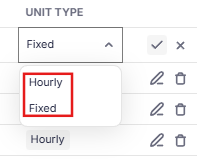
Tier unit Types
- Slab: Price applies incrementally within the defined time range
- Fixed: Flat price applies once the tier is reached
- Use Slab for one tier and Fixed for another
- Combine multiple tiers to create hybrid pricing
- Control pricing progression precisely as parking duration increases
Managing and updating vehicle parking rates
Vehicle parking rates can be updated at any time.
Admins and managers can:
- Edit existing rates
- Activate or deactivate rates
- Add new rates for additional vehicle types
Changes apply only to future parking sessions and do not affect completed sessions.
How rates interact with live parking sessions
When a vehicle enters a parking:
- SISTEM identifies the vehicle type
- Applies the active vehicle parking rate
- Calculates charges automatically during the session
This behavior remains consistent across:
- Manual entry
- Pass-based entry (where applicable)
- ANPR-based entry
Operators do not need to select or calculate rates manually.
Designed to scale with your operations
Vehicle parking rates are designed to evolve without disruption.
You can:
- Start with simple rates
- Add more vehicle types over time
- Introduce new pricing models later
All changes happen within the same structure, without migrations or rework.
Read next
To understand pricing logic in detail:
- Time-based pricing
- Slab pricing
- Fixed pricing
To see how rates are applied during operations: