



















































































Parking Sistem follows a pay-what-you-use approach, allowing you to upgrade or downgrade your parking plan anytime based on operational needs. This ensures you only pay for the capacity and features you actually use.
How plan changes work
Plan adjustments are flexible and designed to support business growth or seasonal demand.
Key principles:
- Upgrade when vehicle volume or facilities increase
- Downgrade when operational demand decreases
- Add-ons can be purchased without changing the base plan
- Changes apply at the next billing cycle (unless otherwise specified)
When to upgrade your plan
Consider upgrading if:
- Monthly Vehicle Entries (MVE) exceed your current plan limit
- You are adding more facilities (e.g., EV charging, valet, lockers)
- Your operator team is expanding
- You require advanced AI insights or integrations
- You are onboarding additional parking locations
Benefits of upgrading:
- Prevent operational interruptions
- Unlock higher AI capacity and analytics
- Support business growth without system migration
When to downgrade your plan
Downgrading is suitable when:
- Vehicle volume decreases
- Facilities are reduced or consolidated
- Seasonal operations scale down
- You optimize operations and need fewer operator users
Important:
Before downgrading, ensure your current usage fits within the lower plan limits to avoid restrictions.
How to upgrade or downgrade
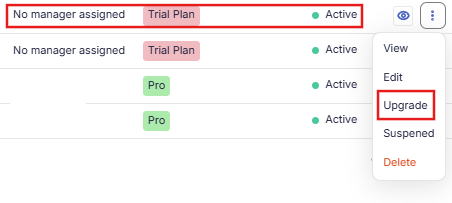
- Go to Organization Settings →Parking lots
- Click upgrade for the parking lot
- Review current usage metrics (MVE, facilities, users)
- Select the new plan that fits your needs either higher or lower plan.
- Confirm the change
The system will:
- Validate usage against the selected plan
- Schedule the change for the next billing cycle
- Notify you once the update is active
Pay what you use flexibility
Parking Sistem ensures you are billed based on actual operational scale:
- Pay according to Monthly Vehicle Entries
- Add facilities anytime without forced upgrades
- Purchase additional AI tokens as needed
- Invite team members and pay only for operational users
This model keeps billing aligned with revenue and usage.
Impact on operations
Plan changes do not affect:
- Existing parking configurations
- Historical data and reports
- Team members and roles
- Facility setups
If a downgrade introduces limits, the system will notify you to adjust usage accordingly.
Best practices for plan management
- Monitor monthly vehicle entries regularly
- Review facility performance before scaling
- Align plan tier with revenue growth
- Use add-ons instead of upgrading when possible