



















































































SISTEM provides a centralized place for Organization Admins to view, review, and download all subscription invoices. This ensures financial transparency and easy access to billing records for audits, compliance, and internal tracking.
Invoices are generated automatically for each subscription cycle and stored securely within the platform.
Where to find invoices
All invoices are available at the organization level.
Navigation path:
Organization Settings → Billing and Invoices
Only Organization Admins can access this section to maintain financial security and control.
What you can see in the invoice list
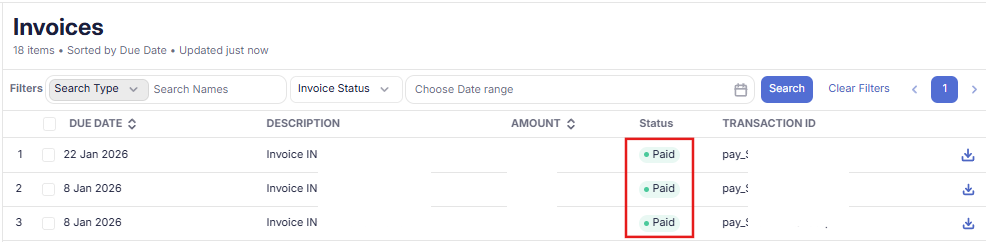
The invoice list provides a quick overview of all generated invoices, including:
- Invoice number or reference ID
- Billing period
- Plan and add-ons billed
- Total amount
- Payment status (Paid, Pending, Failed)
- Invoice date
This view helps you quickly track billing history and payment status.
Viewing invoice details
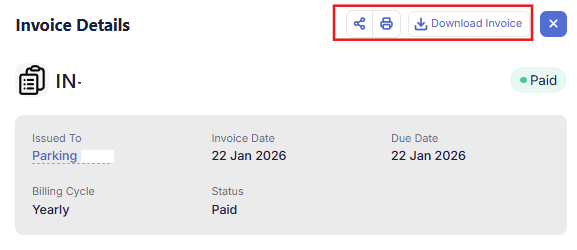
Clicking a specific invoice opens a detailed view with complete billing information.
Detailed invoice view includes:
- Organization and billing details
- Parking or subscription reference
- Plan name and billing cycle
- Add-ons and usage charges (if applicable)
- Tax breakdown
- Total amount paid
- Payment method used
- Invoice date and status
This detailed version ensures full clarity for financial review and compliance. Invoices can be downloaded directly from the detailed invoice view for record-keeping or sharing with finance teams.
Downloaded invoices contain the full billing breakdown and serve as official records.
Why centralized invoice access matters
Centralized invoice access helps organizations:
- Maintain accurate financial records
- Simplify audits and compliance
- Track subscription costs over time
- Ensure transparency across teams
By keeping invoices organized and easily accessible, SISTEM ensures your billing process remains clear, secure, and operationally aligned.