



















































































Multi-parking access allows a single user to manage or operate across multiple parking locations within the same organization. This is essential for organizations that run more than one site and need centralized oversight without giving full organization-level access.
Instead of switching accounts, users can seamlessly work across assigned locations from one login.
Why multi-parking access matters
Organizations with multiple parking facilities often require shared supervision and coordinated operations.
Multi-parking access helps:
- Regional managers oversee multiple site
- Operators cover shifts across locations
- Standardize operations across facilities
- Maintain clear accountability per location
This ensures flexibility without compromising access control.
How multi-parking access works
Multi-parking access is configured by assigning a user to more than one parking location.
A user with multi-parking access can:
- View and manage assigned parkings
- Access reports for selected locations
- Perform operational tasks within permitted roles
They cannot access locations that are not assigned to them.
Who should have multi-parking access
This access is commonly used for:
- Regional or cluster managers
- Floating operators covering multiple sites
- Maintenance or facility staff
- Auditors reviewing multiple locations
Admins should assign access based on operational responsibilities.
How to assign multi-parking access
Only organization admins can assign or modify multi-parking access.
Steps
- Go to Organization settings
- Select Team members
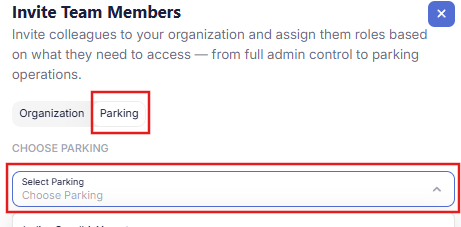
- Choose Parking-level access
- Add a new user or edit an existing user
- Select multiple parking locations from the dropdown
- Assign the appropriate role
- Save changes
The user will now have access to all selected parkings.
Switching between parking locations
Users with access to multiple parkings can switch locations from within the system.
They can:
- Select the active parking from the dashboard
- View location-specific sessions and reports
- Perform tasks for the selected parking
This prevents cross-location data confusion.
Permissions and limitations
Multi-parking access does not grant full organization control.
Access is limited by:
- Assigned role (manager, operator, viewer)
- Selected parking locations
- Organization-level restrictions
For example:
- A manager can configure rates only for assigned parkings
- An operator can create sessions only at assigned locations
- A viewer can only view reports
Operational best practices
- Assign access based on actual coverage areas
- Avoid giving organization-level access unless necessary
- Review multi-location permissions regularly
- Ensure operators confirm the active parking before actions
This prevents operational errors across locations.
Common scenarios
Scenario 1: Regional manager
Assigned to 5 parkings to monitor performance and configure rates.
Scenario 2: Floating operator
Assigned to 2 nearby locations to manage peak-hour overflow.
Scenario 3: Auditor
Given viewer access across multiple parkings for compliance checks.
Read next
To understand roles and permissions:
Understanding user roles
To learn how to add team members:
How to add team members
To manage access levels:
Org-level vs parking-level access