



















































































Parking Sistem provides a 15-day free trial to help you explore the platform and set up operations before committing to a subscription. The trial begins automatically when a parking location is created.
How the trial period works
Trial activation is automatic and requires no manual setup.
Key points:
- The 15-day trial starts immediately after creating your first parking location.
- All core operational features are accessible during the trial.
- You can configure pricing, facilities, team members, and capacity.
- Add-ons such as AI tokens or integrations may be limited during trial (based on configuration).
What you can do during the trial
The trial period is designed to let you fully simulate real operations.
You can:
- Configure parking rates and pricing models
- Add predefined and custom facilities
- Set capacity and usage rules
- Invite team members and assign roles
- Test check-in, check-out, and payment workflows
- Review dashboards and reports
This ensures you can validate workflows before going live.
Trial expiry and upgrade prompt
When the 15-day trial ends:
- The system prompts you to upgrade your subscription.
- Operational access may be restricted until a plan is selected.
- Existing configurations and data remain and accessible after activation.
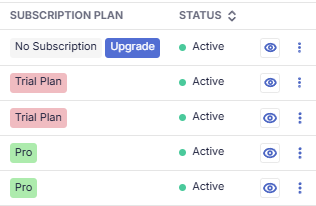
You can check the parking subsciption status from the parking lot list
Activating a subscription
To continue using Parking Sistem after the trial:
- Go to Organization Settings →Parking Lot
- Click Upgrade Plan for the particular parking
- Select a plan based on your parking requirements:
- Monthly Vehicle Entries (MVE)
- Number of facilities
- Operator users
- AI usage needs
- Confirm billing details and activate the plan
Once activated:
- Operations continue without interruption
- All configured settings remain intact
- Add-ons can be purchased anytime
Learn more about subscriptions
Choosing the right plan
When upgrading, consider:
- Expected monthly vehicle entries
- Number of facilities you plan to offer
- Size of your operations team
- Need for automation, AI insights, or integrations
This ensures your plan aligns with operational scale and revenue potential.
Learn more about the pricing
Important notes
- Trial starts per organization, not per user.
- You only need to activate a plan once to continue operations.
- Facilities and add-ons can be expanded without changing your base plan.
Need help choosing a plan?
If you’re unsure which plan fits your operations, contact your Organization Admin or support team for guidance on selecting the most suitable option.